Travix Umrah runs the trip after the sale — pilgrim records, MOFA visa data, hotel contracts, bed-level inventory and room allocation — and hands the costs back to your accounts. Your ledger already knows the money. This knows the movement.
Accounting ends at the invoice. Operations start there.
Most Umrah software is a booking engine with reports bolted on, or an accounting package that stops once the package is sold. Travix Umrah is the operations layer between them: it begins when a group is confirmed and runs until the pilgrims are home. It posts nothing to your general ledger — it raises the documents Travix Finance posts, so one set of numbers stays true.
The money
Travix Finance
Invoices and receipts
Customer and vendor ledgers
Double-entry GL, P&L
Refunds, commission, tax
The movement
Travix Umrah
Pilgrims and MOFA visa data
Hotel contracts and beds
Room allocation
Service vouchers
What Travix Umrah does
Eleven capabilities, all shipping today.
A real pilgrim record, keyed on passport
Pilgrims stop being names typed onto an invoice line. Each one is a record keyed on passport number, with every trip they have ever taken attached to it.
Passport search that returns the pilgrim instantly
Duplicate detection on passport and visa number
Merge two records without losing trip history
Documents against the pilgrim, not the booking
A status per trip, with illegal transitions rejected by the server
MOFA and Nusuk import that remembers your columns
Upload the spreadsheet you already receive. Travix detects the columns, stages every row for review, and only writes once you commit.
CSV, Excel and Nusuk exports
Automatic column detection, saved and reused per format
Every row staged and reviewable before anything is written
Duplicates flagged against existing pilgrims
Failed rows exported as CSV so you can fix and re-upload
Hotel contracts with the beds you actually bought
A contract is a season, a bed count and a cost — not a note in a spreadsheet. Travix tracks what you contracted, what you have used, and what it is costing you.
Hotels with city, distance to the Haram, rating and contacts
Contracts by season with bed counts, rooms and per-bed cost
Draft → Active → Expired lifecycle
Activating a contract raises a draft payable bill in Travix Finance
Alerts for overbooking, low capacity, and contracts expiring with pilgrims still allocated
Bed-level inventory, not a room count
Rooms, beds, blocks and gender restrictions, projected into a live picture of what is free tonight and what is free next Tuesday.
Rooms created individually or in bulk by floor and range
Gender restriction and room state per room
Bed blocks for maintenance, held and released explicitly
Total, reserved, free, blocked and occupancy % per hotel
Daily occupancy calendar against the contracted capacity line
Room allocation that knows the rules
Drag a pilgrim onto a bed and the map tells you before you drop whether it is legal. Capacity, gender and bed blocks are hard rules; family, booking cohesion and age pairing are scored.
Bed map with illegal targets dimmed before the drop
Hard rules enforced server-side, never only in the browser
Auto-allocate proposes a full plan you review before committing
Concurrent edits detected — two staff cannot fill the same bed
Full allocation history, with undo on the last commit
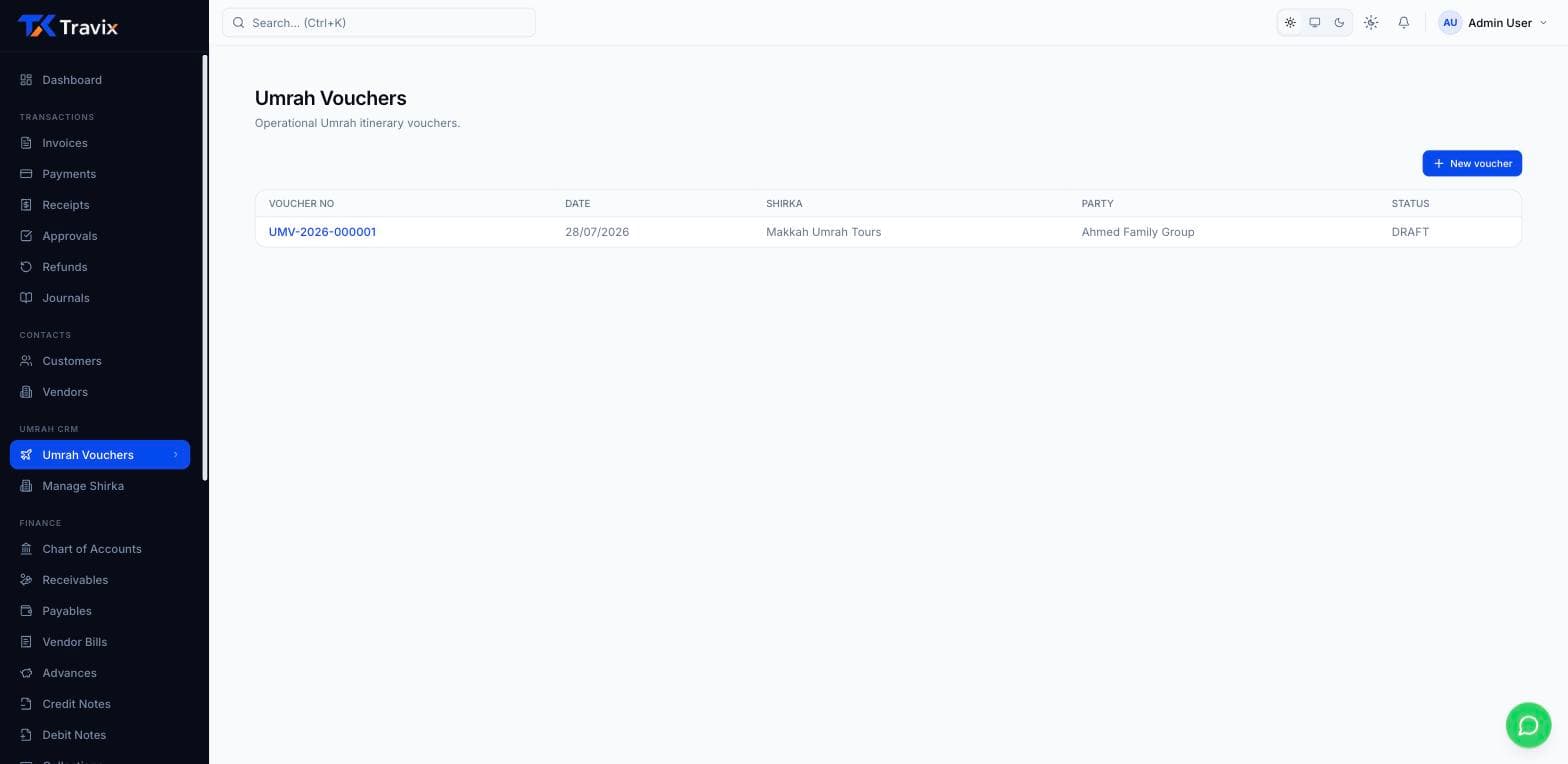
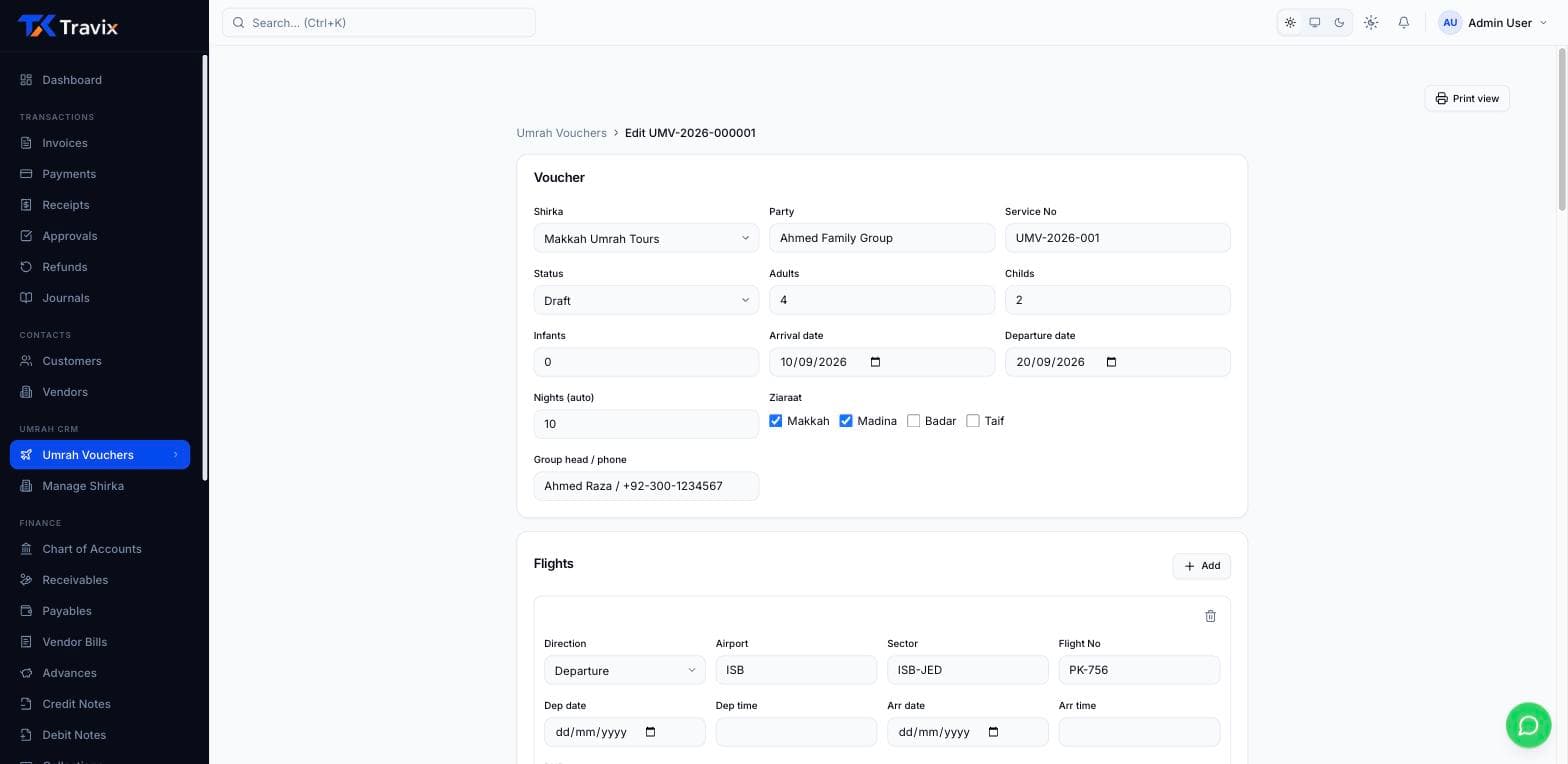
Service vouchers your shirka will accept
The operational document your Saudi ground handler expects, carrying their branding, with the flights, hotels, transport and pilgrim list on it.
Five-state lifecycle with approval and lock/unlock, all audited
Hotel segments linked to the real contract, not retyped
Prefill a voucher straight from a travel invoice
Print view built for the document, not the screen
Transport dispatch that will not double-book a bus
Approving a voucher raises one movement per dated transport segment. From there it is a dispatch board by date: who is on which vehicle, which driver, and what has actually left.
Movements created from the voucher, not typed again
A vehicle cannot be given more pilgrims than it seats
Two overlapping movements on the same vehicle are refused, not silently double-booked
Scheduled, started, completed or cancelled — the board shows the real state
Printable manifest for the driver
Arrivals marked at the airport, on a phone
One arrival record per inbound flight per pilgrim, created when the voucher is approved. Your agent at Jeddah opens the day, finds the flight, and marks people in.
A day view by flight, searchable by name or passport
Marking arrived moves the pilgrim from not-arrived to arrived
The first arrival moves the voucher to in-progress on its own
A double tap on bad airport wifi is ignored, not recorded twice
Assign a pilgrim to a different flight when plans change
Departures, and the manifest for them
The mirror image of arrivals, on the return flights — with the manifest the airline desk and your ground team ask for.
One record per return flight per pilgrim, raised from the voucher
Manifest by flight number, date and airport
Marking departed returns the pilgrim; someone who never arrived cannot skip to it
The last return completes the voucher automatically
Idempotent, like arrivals
Check-in and check-out that free the bed
The step most systems leave to a WhatsApp message. Check a pilgrim in against a real room, check them out, and the bed goes back into inventory the moment they leave.
Check-in requires a room — allocate one inline if they do not have it yet
Check-out releases the bed straight back to the live inventory
Actual bed-nights per contract are reported back, so you can see what you really used
A pilgrim moving to another hotel is transferred, not checked out
A day view of who is arriving into and leaving each hotel
The reports operators already run every morning
Arrival, rooming, occupancy, visa status and the rest of the operational pack — exportable as CSV or Excel, with saved views so the same three reports do not have to be reconfigured daily.
Seventeen reports plus a Simple intimation layout
Starter pack covers arrivals through the rooming list; Professional unlocks the rest
CSV and Excel export, print from the browser
Named saved views per report
Hotel revenue stays an upsell until Travix Finance is on the tenant
Ops and finance teams care that pilgrim records, hotels, and vouchers stay on the same system of record as the invoice.
“We stopped re-typing airline tickets into a separate ledger. The invoice posts AR and supplier AP in one step — month-end stopped being a scavenger hunt.”
Finance manager
Multi-branch agency, Lahore
“Umrah groups used to live in WhatsApp folders. Passports, hotels, and vouchers are finally on the same record as the invoice that paid for them.”
Operations lead
Umrah operator, Karachi
“Reconciliation against airline statements used to take a weekend. Matching the import to the GL is the first time I have trusted the aging report.”
Owner-operator
Travel agency, Islamabad
See it live
See Umrah ops beside your finance ledger
From voucher itinerary to pilgrim records — or book a live walkthrough focused on Umrah operators.